The best teacher apps of 2026, and how to tell them apart

Every list of the best teacher apps has the same problem: the tools on it are not doing the same job, so ranking them is like ranking a hammer against a tape measure.
This one compares four of the best known on the facts that actually decide which you end up using — whether a student needs an account, what the free tier really contains, and which single job each tool is built around. Where a claim is about somebody else’s product it comes from their own public pages, and the date we checked is on it.
Who wrote this, and why that matters
We make TeachRoster, which is the fourth tool on this page. You should read the rest of it knowing that.
What we have not done is give anything a score. Plenty of comparisons like this award the house product five stars and its rivals three, which is an advert wearing a table’s clothes and most teachers can smell it. Every cell below is a fact you can check against the vendor’s own page, and the sections say plainly where another tool is the better answer.
The question that decides it
Before features, ask this: does a student need an account?
It sounds administrative. It is the whole thing. A class of thirty on shared Chromebooks means thirty sign-ins, thirty forgotten passwords by November, and a consent process for under-13s that in many schools has to go past a parent. Tools that need student accounts are wonderful in a one-device-per-child school and quietly unusable in a school with a trolley of laptops.
The four, side by side
Checked against each vendor’s own pages in September 2026. Pricing and free tiers move, so follow the links before you commit a term to one.
| Tool | Student accounts | Free tier | Built around |
|---|---|---|---|
| MagicSchool | Students enter through teacher-created Student Rooms | Core tools with usage limits; Plus $12.99/mo or $99.96/yr | Generating teaching material from a prompt |
| Wayground (was Quizizz) | Not for live games — but required for homework and progress | Free plan available | Self-paced quizzes and analytics |
| Kahoot! | Not stated on the public plan pages | Kahoot! Go — reports cover up to 3 participants | A live game on the projector |
| TeachRosterOurs | Never. A class code and a four-digit PIN, for homework too | Free for teachers, no card, no cap | The whole week: register, quiz, marking, revision |
The row that is ours is marked, and it does not win every column. Three of these four generate better teaching material than we do, and one of them is far better at the thing a projector is for.
MagicSchool — the widest set of teaching tools
MagicSchool is the one to beat on breadth. Its free plan gives a teacher a large set of tools for planning, assessment, differentiation and parent communication, with usage limits rather than a trial clock, and Plus is $12.99 a month or $99.96 a year at the time of writing.
Students reach the student-facing tools through rooms a teacher creates rather than by hunting the site themselves. Its own FAQ does not spell out whether that involves an account, which is worth asking about directly if your school’s answer to that question is strict.
Best for
A teacher whose bottleneck is producing material — differentiated versions, rubrics, letters home, unfamiliar-topic explanations — and who already has somewhere else to put a register.
Wayground — self-paced quizzes and the analytics
Wayground is what Quizizz became in June 2025; old logins and content carried across. Its shape is different from Kahoot’s on purpose: each student works at their own pace on their own device, which makes it the stronger of the two for homework and for formative assessment where you want the detail afterwards.
The account rule is worth reading twice. A student can join a live game with a six-digit code and no account. Tracking progress, or doing work set for later, needs one. If your reason for avoiding accounts is consent forms rather than convenience, that distinction decides it.
Best for
A teacher who wants question-by-question data on who understood what, and whose students already have school accounts.
Kahoot! — the one the room enjoys
Kahoot is teacher-paced and shared: everyone answers the same question at the same time, on a screen at the front. Nothing else here does that as well, and no amount of feature comparison captures what it is for.
The free tier deserves care. Kahoot! Go covers creating kahoots, basic question types, templates and flashcards, but its basic reports cover up to three participants — enough to try it, not enough to see how a class of thirty did. Paid plans run from $36 a year for Bronze to $228 for Kahoot! One.
Best for
Revision before an exam, the last ten minutes of a Friday, an assembly. Live, together, and loud.
TeachRoster — the week rather than the lesson
Ours, so read it sceptically. The premise is that the three tools above each do one job well and none of them keeps your register, so a teacher ends up with a tool for quizzes, a spreadsheet for marks, and the school system for attendance.
- Students never make an account. A class code and a four-digit PIN, for homework as well as live work. No email address is stored for a student, so there is nothing to consent to and nothing to reset in November.
- One upload becomes four things. Photograph a worksheet and it drafts a quiz; that quiz then makes a flashcard deck, a set of notes and a slide deck without describing the lesson again.
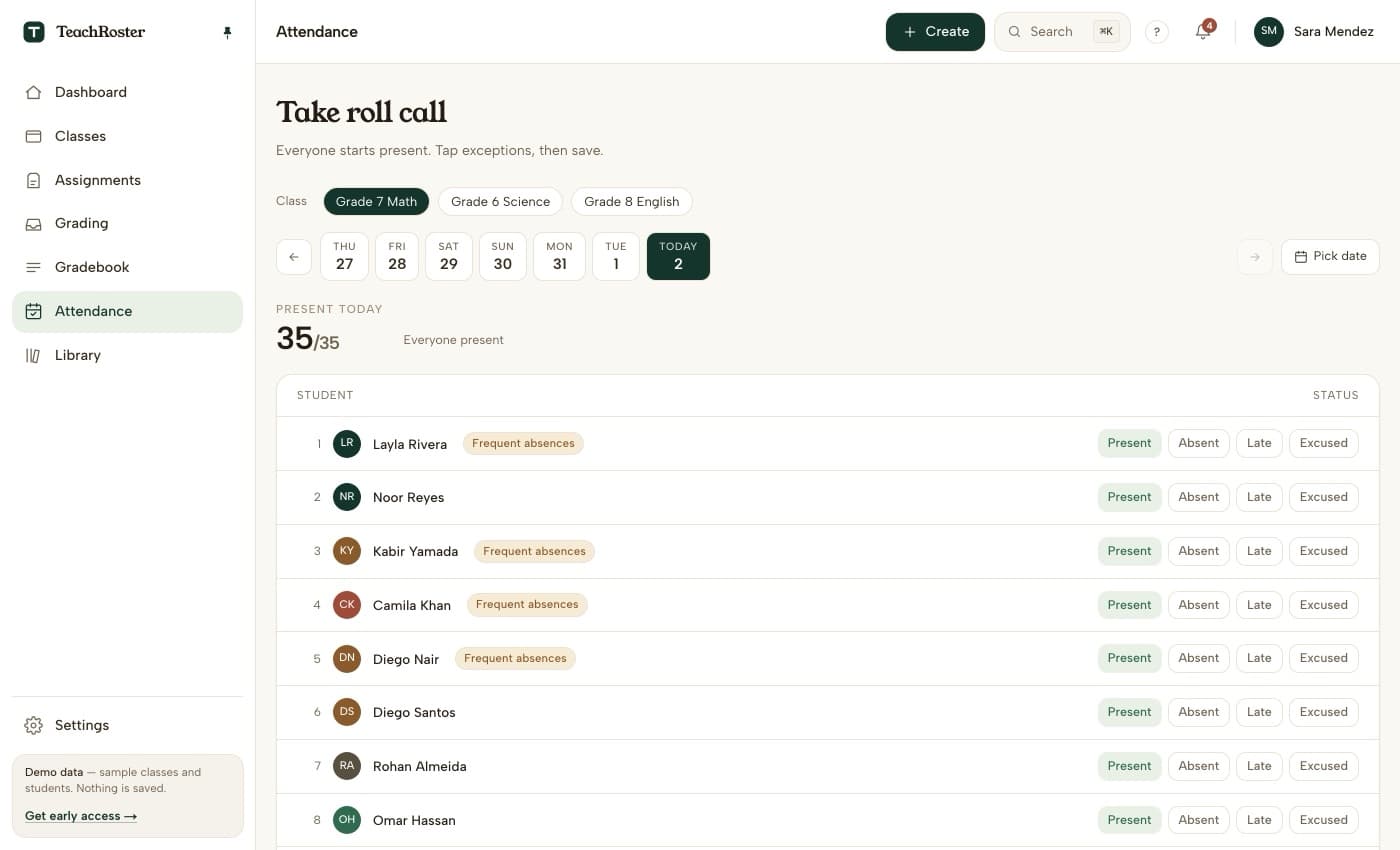
- The register is in the same place. Everyone starts present, you tap the exceptions, and a term of history sits behind each student for the conversation where you need it.
- Marking sorts itself. Multiple choice and true/false settle on submit; short answers get a suggested score with a confidence level and a reason, which you accept or change. The suggestion is never the mark.
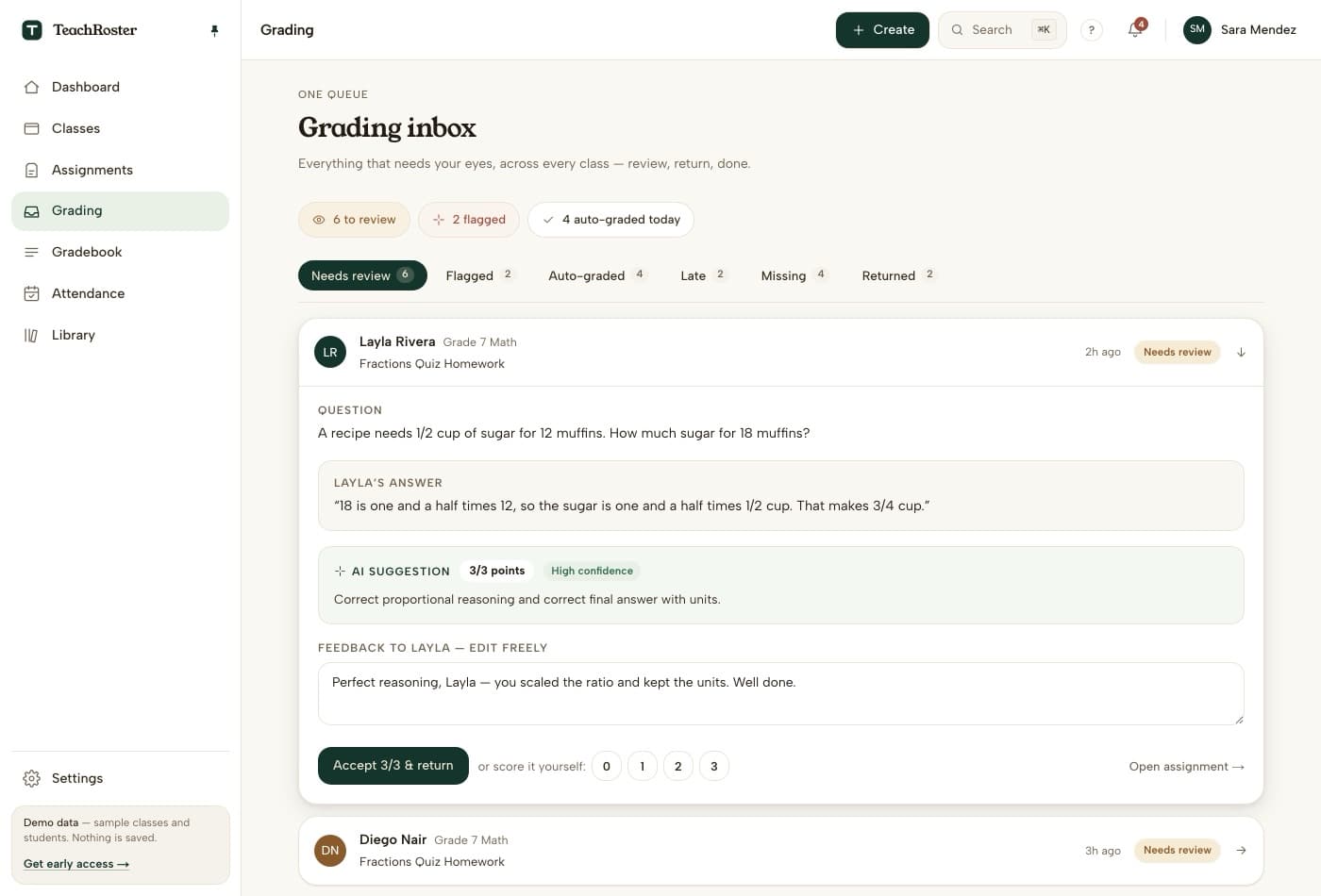
Only our own screens are shown here. The other three products’ interfaces are their work, and a comparison that reproduces four vendors’ screenshots without asking is a takedown waiting to happen — follow the links in the table to see theirs.
We are also the newest and smallest thing on this page. That is a real reason to be careful with us.
Best for
Large classes, shared devices, and schools where getting thirty children signed up is the reason a good tool never got used. Not for you if you need a mature product with years of school deployments behind it — we are new and say so.
Which one, honestly
- Making material is your bottleneck— MagicSchool.
- You want data on who understood what— Wayground.
- You want the room energised— Kahoot.
- Your students have no accounts and you want the register, the quiz and the marking together— TeachRoster.
Most teachers end up with two of these rather than one, and that is a reasonable outcome. The mistake is picking on a feature list and finding out in week three that half your class cannot sign in.
Questions teachers ask
What is the best app for teachers in 2026?
There is no single answer, because the four best-known tools do different jobs. MagicSchool is the strongest at generating teaching material from a prompt. Wayground is the strongest at self-paced quizzes with detailed analytics. Kahoot is the strongest at a live game on a projector. TeachRoster — which we make — is for a teacher who wants the register, the quiz, the marking and the revision in one place without any student making an account.
Which teacher apps let students join without creating an account?
Wayground lets students join a live game with a six-digit code and no account, but an account is required to track progress or to do assigned homework between sessions. TeachRoster uses a class code and a four-digit PIN for everything including homework, and never asks a student for an email address. Kahoot's public plan pages do not state its student account requirements, so check before you rely on it.
Are any of these actually free for teachers?
All four have a free tier and they are not equivalent. MagicSchool's free plan covers its core tools with usage limits. Kahoot! Go is free but its reports cover up to three participants, which is a demo rather than a class. TeachRoster is free for teachers with no card and no participant cap. Free tiers change, so check the vendor's own pricing page before you plan a term around one.
Do I need a separate app for attendance?
With most of these, yes. MagicSchool, Wayground and Kahoot are content and assessment tools rather than registers, so attendance usually lives in your school's own system. TeachRoster includes a register, which is the main reason it exists alongside them rather than instead of them.
Can I trust a comparison written by one of the products in it?
Only as far as it is checkable. Every claim here about another tool is taken from that vendor's own public pages and dated, so you can follow the link and see whether it still holds. We have not given anybody a score out of five, including ourselves, because a rating a company awards its own product next to ratings it awards its rivals is an advert in a table's clothes.
What is the best free quiz app for a class with shared devices?
The thing to check is what happens on the second device. If a tool needs a student account, a shared Chromebook means signing out and back in between lessons, which is where most of the time goes. Wayground handles live play without accounts, and TeachRoster handles both live and homework with a code and a PIN.