Attendance app for teachers
TeachRoster's roll call opens with every student already marked present, so you tap only the exceptions — a class of thirty-five takes seconds — and each day is saved into a history you can search per student when a parent or head of year asks.
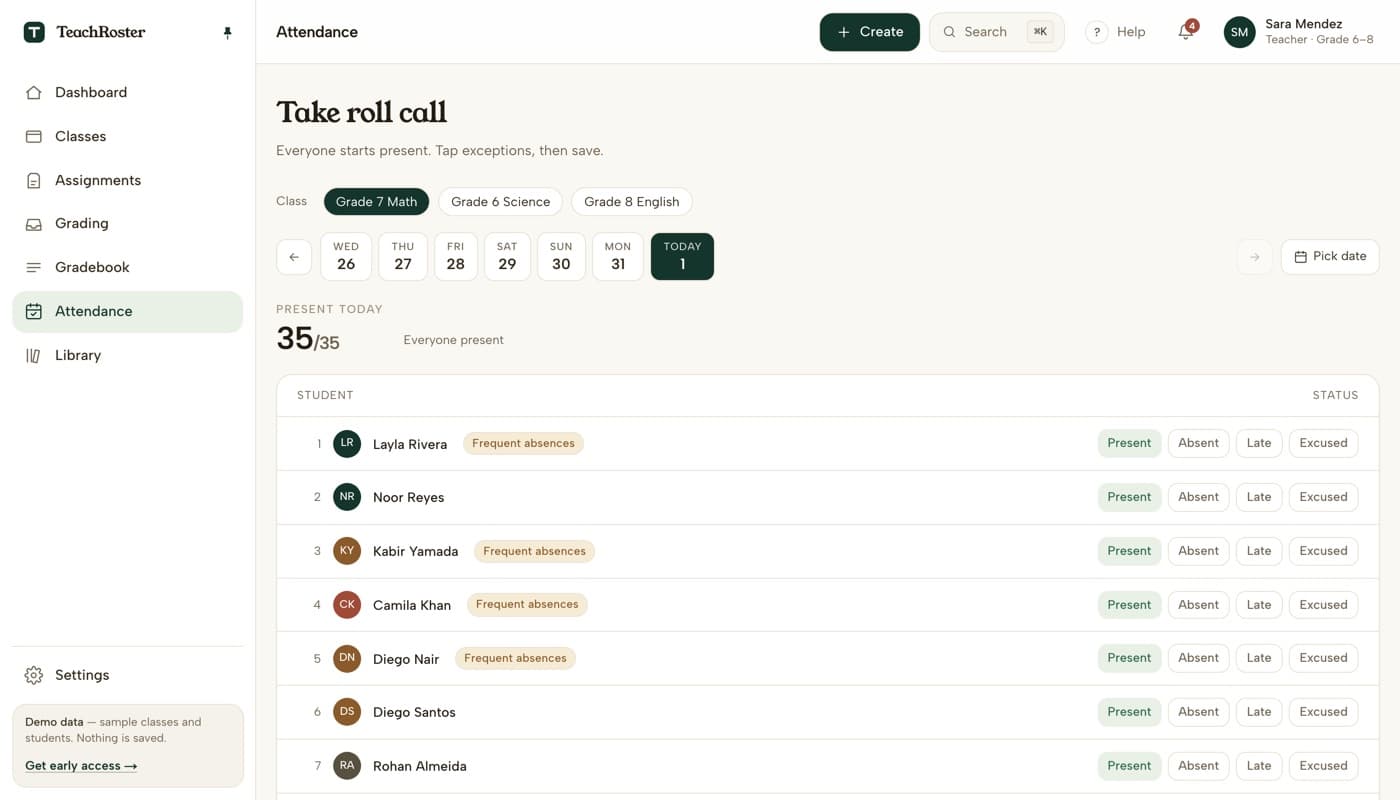
Roll call is the clearest example of software making a teacher's day worse. A register that asks you to mark thirty-five students one at a time is asking for thirty-five taps to record a fact that is usually “everyone is here except two”.
So the default is inverted. Open the class and everyone is present. You tap the two who are absent, the one who came in late, the one with a note — and save. The count at the top updates as you go, so you can check it against the room.
The value shows up weeks later. When a parent asks why their child is behind, or a head of year wants a pattern, the history is already there per student rather than in a stack of paper registers.
How it works
- 1
Open the class
Pick the class and the date — today is already selected, and the last week is one tap away for when you forgot to take it yesterday.
- 2
Tap only the exceptions
Everyone starts present. Mark absent, late or excused for the few who need it. The present count updates live so you can check it against the room.
- 3
Save, and it becomes history
The day is stored against each student. Students with a pattern of absence are flagged next to their name, so it is visible before it becomes a problem.
What it does today
- Everyone is marked present by default — you record exceptions, not the whole class.
- Four states per student: present, absent, late and excused.
- Any date in the past week is one tap away, plus a date picker for older days.
- Frequent absences are flagged beside the student's name.
- Separate register per class, so Grade 7 Math and Grade 8 English do not mix.
- Works in the browser on a phone, so it can be taken from the doorway.
Common questions
Is this attendance app free?
Yes, free for teachers. The demo needs no signup and no install — open the teacher app and take roll call on a sample class of thirty-five students.
How long does taking attendance actually take?
It depends only on how many exceptions there are, because present is the default. A full class is one save. A class with three absences is three taps and a save.
Can I take attendance on my phone?
Yes. It runs in the browser with no app to install, so it works from a phone at the classroom door as well as from a laptop.
Can I fix attendance I got wrong, or take it for a past day?
Yes. The last week is available as tabs and there is a date picker for older days, so a register you forgot on Tuesday can be filled in on Wednesday.
Do parents or students see attendance?
Not today. A teacher sees their own classes; students see only their own work. Parent and school-wide access do not exist yet, and the privacy page says so plainly.
What counts as a frequent absence?
Students with a repeated pattern of absence in the class are flagged beside their name so it is visible while you take the register, rather than something you discover at reporting time.
Keep reading
Start with your own class.
Free for teachers. Sign in with Google, paste your roster, and read out a code — your students never make an account.