AI quiz generator for teachers
TeachRoster's AI quiz generator turns a PDF, a Word file, a photo of a printed worksheet, or a topic you describe into a draft quiz — and every question stays editable until you approve it, so nothing reaches students unread.
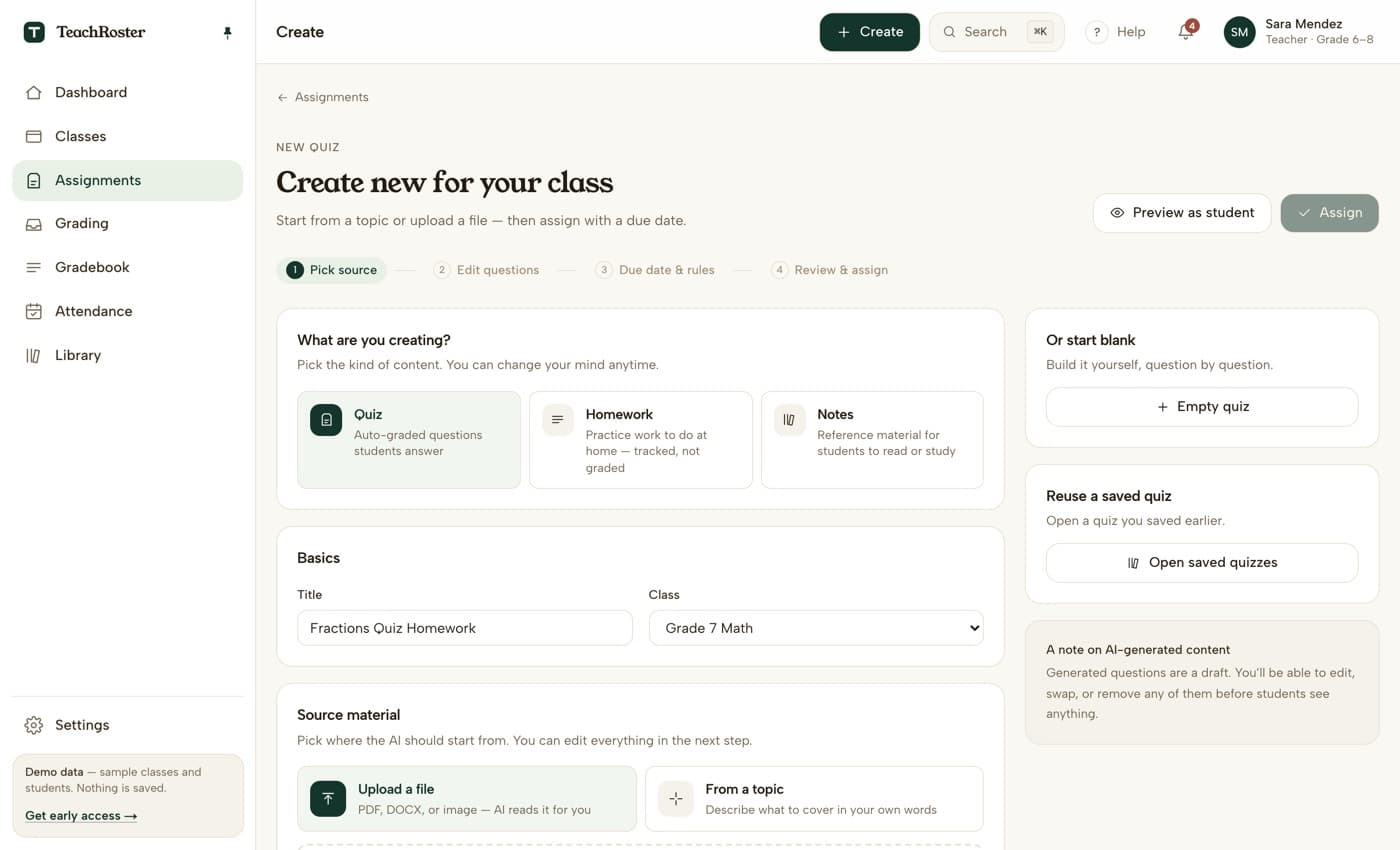
Most quiz makers ask you to start from nothing, and that is the slow part. You already know what the quiz is about. What costs the evening is typing twenty questions out, inventing three plausible wrong options for each one, and keeping the answer key straight while you do it.
So it starts from what you already have. Upload the PDF, the Word file, or a photo taken on your phone, and the questions are drafted from that page — its numbers, its worked examples, its wording — rather than from general knowledge about the topic. No worksheet to hand? Describe the topic instead; “one-step equations, Grade 7, mix of multiple choice and short answer” is enough to start.
Everything it produces is a draft. You land in an editor where you can rewrite a question, swap a wrong option, delete the one that missed the point, or add your own. Only then does it get a due date and a class.
How it works
- 1
Start from what you have
Upload a PDF, a Word file or a photo of the page — or type the topic in your own words. You can also start blank and build it question by question.
- 2
Edit every question
The draft opens in an editor. Rewrite the wording, change the correct answer, remove a question, or add one of your own.
- 3
Assign with a due date
Choose the class and set the due date. Students open it with the join code you read out — no account, no email address, nothing to install.
What it does today
- Question types: multiple choice, true/false and short answer.
- Source material can be a PDF, a Word file, or a photo of a printed page.
- Every generated question is a draft — nothing is assigned or shown to students without your approval.
- Quizzes save to your library and can be reused or edited for the next class.
- Multiple choice and true/false grade themselves the moment a student submits.
- Short answers match the wordings you said you would accept; anything else waits for you.
- Students open the quiz with a class code — no account and no email address.
What it will not do
Worth knowing before you build a term around it.
- Give students hints or explanations. There is no student-facing AI in TeachRoster at all yet.
- Fill-in-the-blank questions. Three types today: multiple choice, true/false and short answer.
Common questions
Is the AI quiz generator free?
Yes. TeachRoster is free for teachers, and the demo needs no signup or install — you can open the teacher app and click through the whole flow right now.
Can it make a quiz from my own worksheet?
Yes — that is the main way it is meant to be used. Upload the PDF or Word file, or photograph a printed page with your phone, and the questions are drafted from that material rather than from a generic question bank. The file is kept for thirty days, then deleted.
Does this work for college or university, or only school?
Both. The level field is free text and the generator is pitched to whatever you type in it — "Year 2 undergraduate" produces undergraduate questions, not a simplified version of them. Students join a seminar group with a code and a PIN exactly as a school class does, with no account and no email address.
Do students ever see AI-written questions I have not checked?
No. Generated questions arrive as a draft in an editor. They are not assigned, published or visible to any student until you set a class and a due date yourself.
What question types can it generate?
Multiple choice, true/false and short answer. The first two are graded the moment a student submits. A short answer is matched against the wordings you said you would accept, and anything left over can be sent for a suggested score with a confidence level and a reason — which you accept or change. The suggestion is never the mark.
Can students just ask the AI for the answers?
There is no student-facing AI in TeachRoster today, so there is nothing for them to ask. Students see the questions you approved and nothing else. Per-assignment help rules are on the roadmap, not shipped.
Does it work in languages other than English?
TeachRoster is built for classrooms in the United States, Spain and across Europe, with South Asia next, and the interface is English today. Question generation in Spanish and other European languages, and a translated interface, are on the roadmap — not shipped.
Keep reading
Start with your own class.
Free for teachers. Sign in with Google, paste your roster, and read out a code — your students never make an account.