An AI flashcard maker for teachers, from your notes or a PDF
TeachRoster is a free AI flashcard maker for teachers. Upload the notes or PDF you already teach from, describe a topic, or pick a quiz you already wrote, and it makes a revision deck — a question on the front, a short answer on the back — that you can edit before you assign it to a class. Students go through it on a phone, and you can see afterwards which cards your class keeps getting wrong.
Most flashcard tools ask a teacher to write the deck. That is the same work as writing the quiz, done twice, which is why most classes never get one.
So the deck is drafted rather than authored. Upload your notes, a PDF or a photo of the page and the cards come from what is on it — its terms, its numbers, its worked examples. Or turn a quiz you already wrote into a deck: a multiple-choice question becomes a card with the correct option on the back, a true/false becomes the word, a short answer becomes the first spelling you said you would accept.
Everything stays editable afterwards, because a good quiz question is not always a good card — but you start from something rather than from a blank deck.
How it works
- 1
Start from what you have
Upload your notes, a PDF or a photo of the page, describe a topic, or pick a quiz you already wrote.
- 2
Check the cards
Fronts and backs arrive as a draft. Change a card, cut one, or add the one it missed.
- 3
Give it to the class
Students work through it on a phone at their own pace. Cards they mark 'not yet' come back at the end of the pass, so a deck cannot be finished while three cards are still unknown.
What it does today
- A deck comes from your notes or a PDF, a topic, or a quiz you already wrote — you do not write the cards by hand.
- Every card stays editable, and you can add the cards it did not think of.
- Students tap to turn a card over, then say whether they knew it.
- Cards answered 'not yet' come back in the same session; a card a student knew comes back after 1, 3, 7, 16 and then 35 days.
- Nothing is marked: a deck is practice and never counts towards a grade.
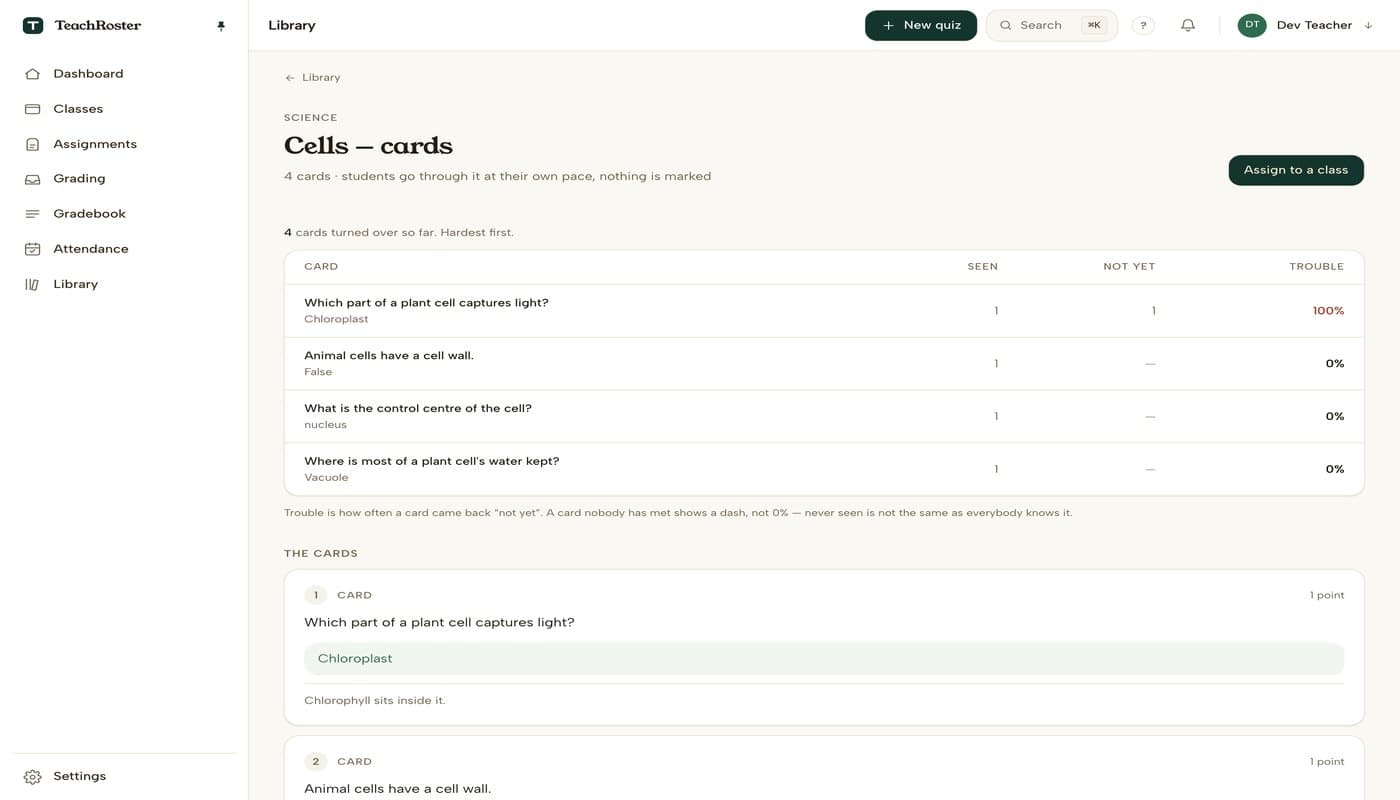
- You see how often each card came back wrong, hardest first — and where every student stands on the deck, furthest behind first.
- A card nobody has met shows a dash rather than 0%, because never seen is not the same as everybody knows it.
What it will not do
Worth knowing before you build a term around it.
- A deck made from a quiz keeps the images you attached to its questions; a deck generated from notes, a PDF or a topic is text only. There is no audio.
- From a blurred photo you get fewer cards, not invented ones — only what can be read off the page becomes a card.
- Students cannot make or share their own decks.
- Nothing here is graded, so a deck cannot be used as an assessment.
Common questions
How do I make flashcards from a quiz?
Open the quiz in your Library and press Make flashcards. TeachRoster builds a deck from the questions you already wrote — the question on the front, its answer on the back, and your explanation underneath. You can edit any card afterwards.
Is there a free AI flashcard maker for teachers?
TeachRoster is one: it is free for teachers, and it makes a deck from your notes, a PDF, a photo of the page, a topic, or a quiz you already wrote. A generated deck arrives as a draft for you to check; a deck made from your own quiz is ready at once, since every card comes from a question you already approved. No student sees either until you assign it. Students join with a class code and never make an account, and you see which cards the class keeps getting wrong.
Can it make flashcards from my notes or a PDF?
Yes. Upload the PDF, the Word file or a photo of the page, and the cards are drafted from what is on it rather than from general knowledge about the topic. The file is kept for thirty days, so the same upload can make a quiz, notes and slides without uploading it again.
Do students need an account to use the flashcards?
No. Students join a class with a code you read out and pick a four-digit PIN. There is no email address and no app to install — the deck runs in a phone browser.
Are flashcards graded?
No. A deck is always practice and never counts towards a grade. The only thing recorded is the student's own verdict on each card, which is what tells you which cards are hard.
How do I know which flashcards my students find hard?
The deck page lists every card with how many times it was seen, how many times it came back 'not yet', and a trouble percentage — sorted worst first. It is a row per flip rather than a running total, so a card a student finally gets right on the fourth pass still shows it took four passes.
Can students go through a deck more than once?
Yes, as many times as they like. Cards they mark 'not yet' come back at the end of the same pass, and the deck stays available on their home screen rather than moving to 'handed in'.
Is TeachRoster's flashcard feature free?
Yes, free for teachers, including generating the deck.
Keep reading
Start with your own class.
Free for teachers. Sign in with Google, paste your roster, and read out a code — your students never make an account.