A free online gradebook for teachers
TeachRoster's gradebook is free for teachers and fills itself from the work you return: one row per student, one column per graded assignment, each mark as a percentage, and an average beside it. A student who never handed something in shows a dash, never a zero, and the whole table downloads as a CSV.
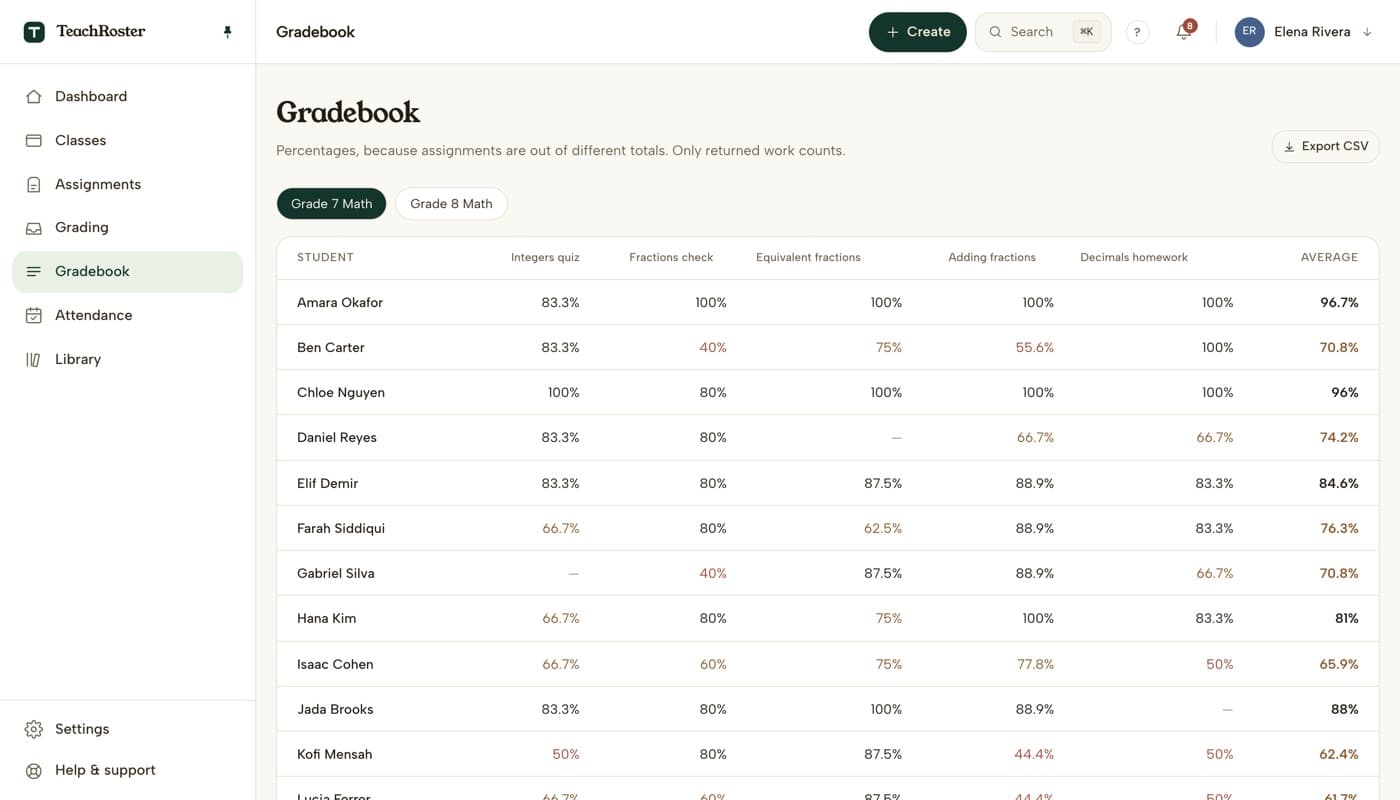
Most gradebooks are a second job. The quiz is marked in one place, then the marks are typed into another, and the typing is where the mistakes come from — a transposed digit, a zero for a student who was simply absent, a column for the wrong class.
Here there is nothing to type. Multiple choice and true/false mark themselves when a student hands in, you settle the short answers no rule could, and the moment you return the work its marks land in the gradebook. Until you return it, nothing does — so a half-marked quiz never shows up as a class of low scores.
Everything is a percentage, because a five-question check and a twenty-mark test should not be compared in raw points. The UK calls this a markbook; it is the same table.
How it works
- 1
Set work as graded
When you assign a quiz, choose whether it counts towards marks. Graded work goes in the gradebook; practice never does.
- 2
Mark and return
Objective questions mark themselves on hand-in. Settle the short answers in the grading inbox, then return the set in one action.
- 3
Read it, or take it with you
Marks appear as percentages with an average per student. Export the class as a CSV for a report or a school system.
What it does today
- One row per student and one column per graded assignment, in the order you set them.
- Every mark is a percentage of that assignment's points, so work out of different totals compares fairly.
- Only returned work counts. Handed in but not yet returned shows nothing.
- A student who never handed an assignment in shows a dash, never a zero, and the dash does not pull their average down.
- Each student's average is the plain mean of their percentages, so every assignment counts the same.
- Practice assignments, flashcard decks and notes never appear in it.
- Switch between classes with a tab; download any class as a CSV with the same rows and columns.
What it will not do
Worth knowing before you build a term around it.
- No weighting or categories. A homework and a test count the same towards the average.
- No letter grades or standards-based scales — marks are percentages.
- No sync with a school information system. The CSV is the way out.
- Parents cannot see it, and students only ever see their own returned work.
Common questions
Is there a free online gradebook for teachers?
TeachRoster's gradebook is free for teachers and runs in the browser. It fills itself from the quizzes you return — no typing marks in — and shows each one as a percentage with an average per student. Work a student never handed in shows a dash rather than a zero, and the class downloads as a CSV.
What is a markbook?
Markbook is the UK word for a gradebook: the table of every student's marks across a term. TeachRoster's gradebook is a markbook in that sense — a row per student, a column per piece of assessed work, as percentages.
Why a dash and not a zero for missing work?
Because never handed in is not the same as got nothing right. A zero would drag the average down for a student who was absent; a dash keeps the average about the work they did, and makes the gap visible so you can chase it.
Do I have to type marks in?
No. Multiple choice and true/false are marked the moment a student hands in. Short answers that match what you said you would accept are marked too; anything else waits in the grading inbox for you to settle. When you return the work, the marks appear in the gradebook.
Can I keep a quiz out of the gradebook?
Yes. When you assign it, set it as Practice instead of Graded. Practice work is still marked and still returned to students, but it never appears in the gradebook or the average.
Can I export the gradebook to Excel or Google Sheets?
Yes. Export CSV downloads the class as a file with one row per student, one column per assignment and an average, which opens in Excel, Google Sheets or Numbers.
Can I weight assignments or use categories?
Not today. Every graded assignment counts the same towards a student's average. If your school weights homework and tests differently, export the CSV and weight it there.
Keep reading
Start with your own class.
Free for teachers. Sign in with Google, paste your roster, and read out a code — your students never make an account.